


Bitsa: the prepaid card for your personal project
Starting a personal project is not easy at all. There’s always excitement, but it also comes with a long list of expenses that grows much faster than we expect. A wedding, for example, involves coordinating catering, photographer, music, and transport. If your project is a renovation, you have to gather builders, electricians, and material suppliers. A small business can accumulate hosting payments, design, advertising, and paperwork. Anyway, whatever it is, it means expenses.
The problem comes when all those charges come out of the same account where your salary arrives and you pay the bills. At the end, reviewing how much you’ve actually spent becomes a complicated task.
For this, a solution would be a prepaid card like Bitsa. Imagine being able to separate that project from the rest of your economy. The idea is simple: use a specific card to concentrate payments, control the balance from the app, and have a clearer view of how the budget evolves and what margin you have for your project.
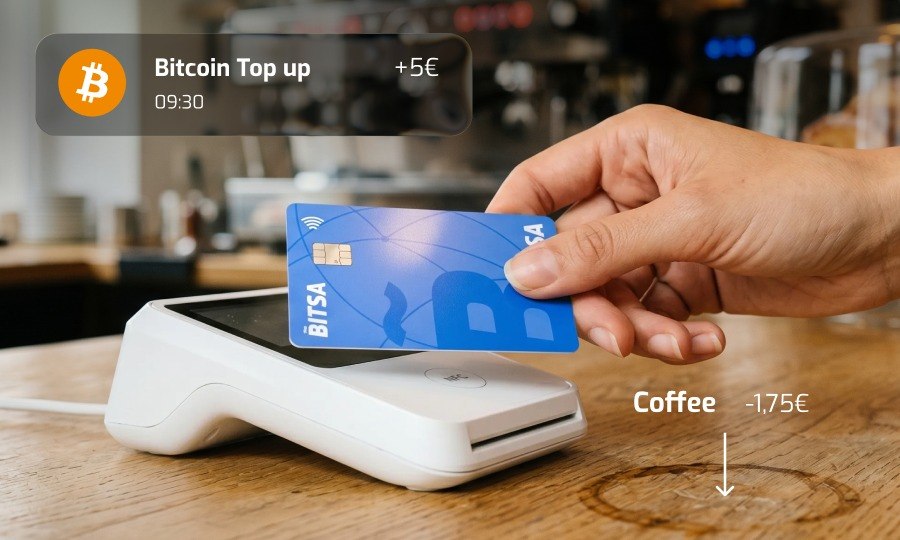
How to control the project budget
Before going into details, first let’s understand how Bitsa works. It’s a prepaid card that’s managed from an application and works with previously loaded balance. You don’t need to link it to a traditional bank account to use it, although you do need to complete the corresponding registration and verification process.
This functioning applied to your project can give you many advantages. If you’ve calculated that a renovation will cost 15,000 euros or that the wedding will have a budget of 8,000, you can load the money directly to the card. In a prepaid card, the loaded amount will be exactly the same as available. It’s not a credit line that you can exceed.
The interesting thing about Bitsa is that you can reload with transfer, another card, cryptocurrencies, and even with cash through vouchers. You can use the method that’s most comfortable for you.
Bitsa will help you have a visible cap and will change your way of making decisions. When an extra appears (more expensive flowers, better quality material, or an additional functionality for the website), you no longer decide on an abstract forecast, but on a balance that you can consult. If you want to accept it, you’ll have to reorganize the budget and manage.

Many suppliers, a single card
Whatever the project is, it will always bring together payments from several suppliers and of different types. In a wedding, catering, photographer, DJ, invitations, and transport may appear. In a renovation, the builder, plumber, electrician, and material purchases. In a startup, hosting, designer, trademark registration, work tools, and advertising.
Imagine the chaos that all those charges mixed with rent, groceries, light, water, gas payments… would mean. No matter how much you try later to isolate payments unrelated to the project, it would take you a lot of time and work to get a clean figure of expenses.
If you use a single prepaid card for the project, you’ll create an automatic grouping. Payments appear in your Bitsa card history and you don’t have to manually separate each movement from the rest of your financial activity. Additionally, Bitsa allows you to consult the balance and history from the application, you can even download the movements in PDF and print them if you’re one of those who keep everything on paper.
If you move these expenses to a single prepaid card, you can keep the main flow of your account intact while you focus on your project. The salary and usual bills continue in their place, and the extraordinary expenses have their own circuit.
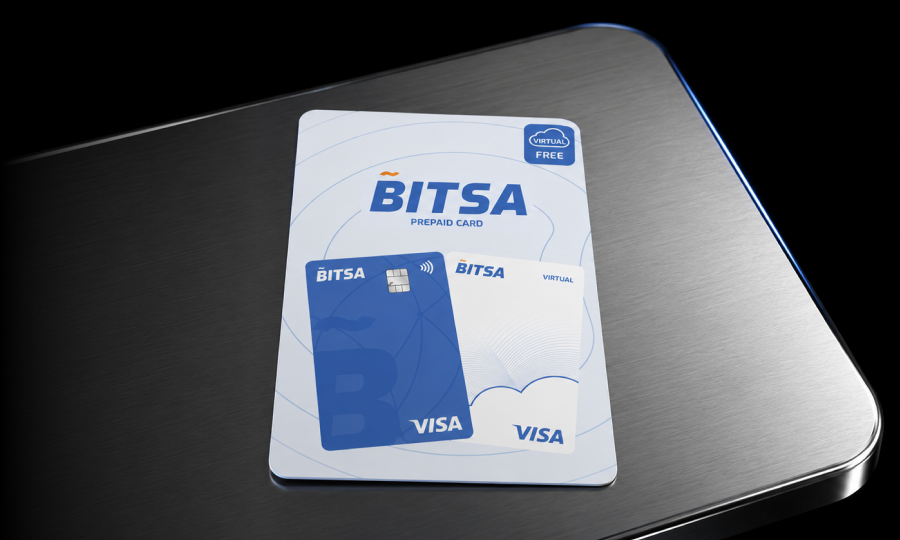
Project expenses always in sight
When you’re already into the project, you normally need constant access to the accounts. You’ll have to see how much you’ve spent so far, if they’ve already charged you for handling expenses, or if you still have margin for some more expense. These constant reviews from a bank app are a bit complicated. Before reaching the movement you’re looking for, you find the salary, bills, daily payments, and other movements that have nothing to do with the project.
With a separate card, if you ask yourself “how much have I spent so far?”, you have the answer in seconds. You enter the Bitsa app, review the balance, and consult the movements associated with that card. Additionally, operation notifications can alert you when a payment is made. If an unexpected charge or a purchase you don’t recognize arrives, you’ll notice immediately.
Mind you, this doesn’t replace keeping a detailed budget, especially in large projects. But it does reduce the classification work and allows a quick check from the mobile. Two taps are more than enough to know if the spending pace is maintained within what was planned.

What to do with the card when the project ends
Once the project is finished, the first thing is to celebrate it. Afterward, when the wedding is over, the renovation is closed, or the startup is up and running, it’s time to organize the accounts. Since you’ll have the payments focused on a single card, that closing will be easier for you because the project is grouped in a single history.
Switching to Bitsa will also help you avoid leaving active services that you no longer need. Instead of having a design subscription, a hosting provider, or a payment authorization linked to your main card, you can review and cancel the services associated with the project card. Keep in mind that since it’s prepaid, they can never charge you more than what you have loaded on the card, so you can see which subscription or charge is still active and cancel it in time.
Just because the project ends doesn’t mean you have to stop using the card. Afterward, you can keep it for future objectives or use it as a secondary card. In the case of Bitsa, there are no inactivity fees, so you can keep your card without worrying.
Basically, the problem of all expenses coming out of the main account disappears when you separate the expense flow. With Bitsa, you can define a budget, load the balance all at once or in phases, concentrate supplier payments on a single card, and consult the evolution from the app. You reload your account with transfer, card, or cryptocurrencies and that’s it.
Now you know, when you organize a wedding, a renovation, or a startup, you can try this system from the beginning. It won’t make the project cost less by itself, but it will help you know how much you’ve spent so far and to decide more clearly before accepting the next extra.
Frequently asked questions (FAQ)
Is Bitsa a bank account?
No. Bitsa is a prepaid card managed from an app. It works with previously loaded balance and is not a traditional current account.
Can I use Bitsa if I don’t have a bank account in Spain?
Yes. You can reload the card with transfer, another card, cryptocurrencies, or cash vouchers, without needing to link a Spanish bank account.
Can I exceed the loaded budget?
No. Since it’s prepaid, you can only spend the amount you have loaded. This acts as an automatic cap and prevents overdrafts.
What happens if there’s an unexpected charge or an active subscription?
You’ll receive a payment notification in the app. Since it’s prepaid, they can’t charge you more than the available balance, which makes it easier to detect and cancel services you no longer need.
Can I download the movements to keep accounts?
Yes. Bitsa allows you to consult the history in the app and download the movements in PDF, useful for printing or attaching to your project tracking.
Are there inactivity or maintenance fees?
It depends on the plan, but with Bitsa, there’s no inactivity fee. Always review the fees before choosing your plan.